 |
|
|
||||||||||
|
Last Updated |
||||||||||||
|
||||||||||||










 |
|||||||
|
|
|
|
||||
|
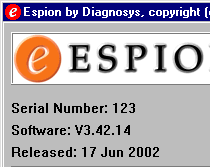
[V3 Software], [Software Update Format], [Installation Instructions] Espion Software UpdatesDiagnosys regularly release software updates to the Espion system and related products. These updates may be obtained from this web-site, or via CD-ROM/Zip disc if you contact Diagnosys directly. These software updates are released in three distinct file types, but all files require some form of unzip program. Current versionEach new release of software increases the software build number allowing you to keep track of your current version. The current Espion software version is displayed on the main menu of the program just under the Espion logo. The first number denotes the current software version (currently V3) and the last number of the software version denotes the current build number in this case build number 14. The software release date is also displayed underneath. Goto download the current version for the latest patches and updates.
You can obtain the latest windows version of WinZip from various locations obtained from the web e.g. www.winzip.com or download a Windows or DOS version from here. Database FilesUpdating your existing software with a new patch/partial install will not effect your current database files. However, as a precaution we do recommend backing them up first. |
|||||||

 |
V3 software includes many new features and bug fixes compared to V2. No changes have been made to the database format, ensuring full compatibility with V2 databases.
Highlights
- Support for the ColorDome (Desktop Ganzfeld)
- Support for dual ColorBursts, dual ColorDomes, and the new PSG pattern stimulator
- Configure System and Configure Protocols now displayed in tree structure rather than menu format to accommodate more options
- Support for sequential eye tests using single channel (ColorBurst) and tests with dual DTLS where one is used as the reference to the other
- Support for EOGs with the ColorDome
- New Export function to make it easier to automate the export to SigmaPlot and Excel
- Printer and export menu options can be configured on a protocol basis.
- Many other new protocol options
|
Software is released in the following formats to reduce space and download time. No format will overwrite your existing calibration, local setup or database files.
Patch
A patch file contains only the files that have changed from the last full release. Patches are released regularly, and may contain bug fixes and/or new features. Often they contain customer specific features that may or may not be of general interest to most customers. We recommend only downloading and installing a patch file if you really need the new features, or the bug fix as they have not in general, had the same amount of testing as a full release. You do not need to download and install intermediary patches, between your last full installation and the current patch.
Installl
This file contains a full installation of the software, but does not include database installations, manual, or other non-important files.
Full
This file contains a full installation release of all files including database client & server installations. We don’t enable these to be downloaded from the web, as they are supplied with all products that require them.
|
Before installing any new files onto your Espion console or PC, make sure you have made a backup copy of the files that will be overwritten, or a backup of the entire directory. This ensures that you can always return to your previous setup should there be a problem with the new software.
NOTE: Always make a copy of your ESLOCAL.INI file and any files with a “.CAL” extension.
New Installation on a client PC
If you are installing a copy of the Espion software on a client PC (you need an Espion client license available from Diagnosys) you will find the following document very useful Install Espion on client.pdf [78kB]. You must install the database client software and the Espion software and optionally the database server software depending on the server/client configuration required all of which can be found on the client CD supplied by Diagnosys.
Update to current installation
If you wish to update an existing Espion software installation, then the first thing to do is to back up the contents of the current ESPION directory (normally C:\ESPION). if you are updating with a partial update file, then you may either copy the current directory, or simply rename it. If you copy it, then the new files will be written to the existing directory overwriting any older files with newer ones. if you rename the old directory, then a new directory will be created and the new files copied into it. If you update with a patch update file, then you must copy the old directory and unzip the patch files over the old files. The patch file only contains updated files, but does not include any installation routines.
After Updating
After you have updated your current installation, if you have created a new directory for the update, then you must copy the ESLOCAL.INI file from your old directory into the new one. This file contains your stimulator calibration settings (Pre software version V3) and local program setup. You must also copy all files with the “.CAL” extension as these contain stimulator calibration settings (V3 onwards) e.g. COLB123.CAL which contains calibration parameters for ColorBurst S/N 123. If you updated by overwriting files in your current directory, then these files will still be available to the new software.
Connecting with your old database
If you created a new directory with the new software, then when you run the software for the first time, it won’t recognize the path and filename of the last database connected. The standard database is called ESPION.GDB and it normally resides in a subdirectory of the ESPION directory called DATABASE e.g. C:\ESPION\DATABASE\ESPION.GDB. You can either copy over the database directory before you run the program, or run it, say no to creating a new database, and then from the “Database Center” control window, press the connect button and type in the path and filename of the previous database.
Copyright © 2003, Diagnosys LLC
Suite 500, 175 Cabot Street, Lowell, MA 01854, USA
Phone: +1 (978) 458-1755 Fax +1 (978) 458 1600